



 6 Layers of Protection



SC is a WordPress malware campaign best known for putting casino spam on other people’s websites, though the kit can do more: it adds hidden admin accounts, captures logins, and installs whatever its operator sends. Keeping it on those sites is where most of the attacker’s effort goes. Since March, its operator has shipped more than 25 versions and tested builds against Imunify on a server they rent. By September, they had a version that keeps a record of which of its hiding places were cleaned and decides, one at a time, whether to come back.
Security researchers have been publishing on SC since August. Each write-up describes the version its authors met on the sites they cleaned at the time. Our record goes back further. The first samples date from late March, and we have been detecting and cleaning SC on Imunify360 servers since then. Six months of that record show how quickly a campaign like this now adapts.
For a hosting provider, SC is the malware ticket that reopens. It hides in many places on a site at once, and each component can rebuild the others, which is what the write-ups mean when they call it “self-healing”.
Most of those places are familiar from years of WordPress cleanup. But there’s a route we haven’t seen used like this at scale before: the WordPress admin’s browser. SC registers a service worker, a script the browser keeps for a site and runs on its own. On their next logged-in visit, it uses their session to write the malware back.
And SC keeps changing. We hold more than 25 versions from six months, a new one every week or two, and each looks like an answer to whatever removed the one before. In early September, the version number went from 4.3.0 to 4.3.24 in four days. Whether AI tools help write it, the code can’t tell us, because every build is machine-obfuscated before it ships.
More than 25 versions in six months
| Date | Event |
|---|---|
| 25 Mar | First counterfeit plugins, no version number yet |
| 28 Mar | Version 1.0.0 |
| mid-Apr | One build deployed to every site on large shared servers |
| 9 Jun | Version 3.0.0, a rewrite (there is no 2.x) |
| 12 Jun | Version 3.1.0, nearly the full kit |
| 3 Aug | Version 4.0.3, the one most write-ups describe |
| 3 Sep | Version 4.3.24 tracks what was cleaned |
| 23 Sep | Version 4.6.1 moves its core into the database |
| 3 Oct | Version 4.7.1 sees through a trick defenders used to block it |
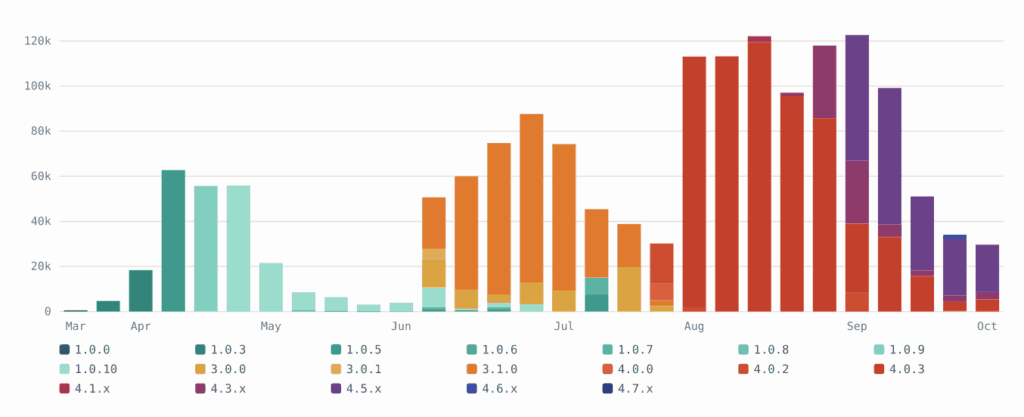
WordPress sites where Imunify found SC files each week, from late March to early October, coloured by the version of SC found there. The last week is partial (5–8 October).
Versions 1 to 3: SC builds its full kit
SC was built to stay from the start. The first trace, on 25 March, is twelve counterfeit plugins with no version number yet, each file dated a year in the past so it wouldn’t stand out among recently changed files. Three days later, the same code carried its first version number: 1.0.0.
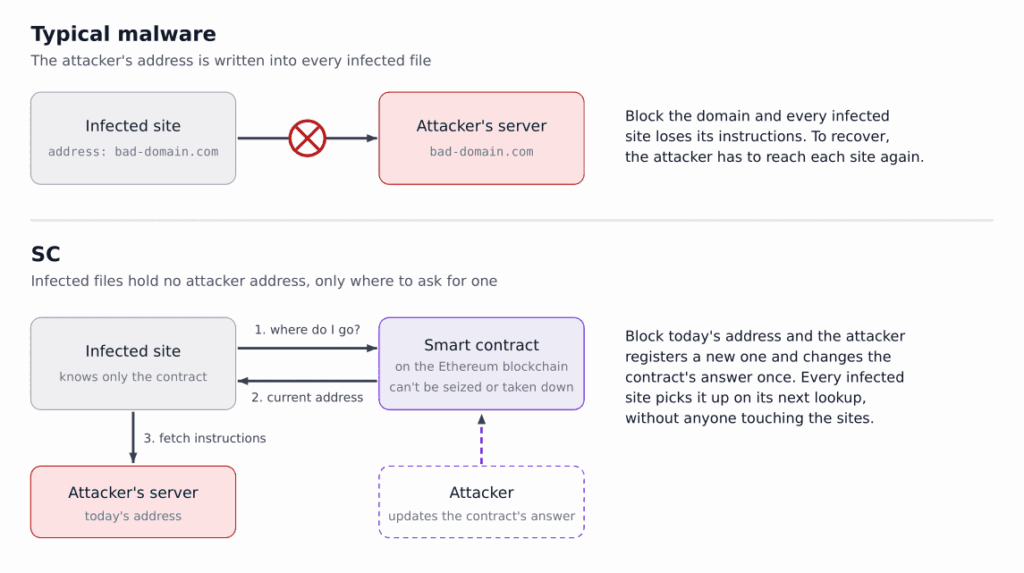
Most malware has the address of its command server written into its files, so blocking that one domain cuts off every infected site. SC’s files hold no such address, only where to ask for one: a smart contract on the Ethereum blockchain, which hands back the current address. The contract can’t be seized or taken offline the way a server or a domain can, and the attacker can change its answer at any time. When an address gets blocked, they register a new one and update the contract once, and every infected site follows without anyone touching the sites.
In mid-April, the malware operator changed how it spread. Instead of many small builds spread over a handful of servers each, one build went onto every site on a few large shared hosting servers at once, and the number of affected sites in a week went from about 18,000 to more than 60,000.
Version 3.0.0, on 9 June, was a rewrite. There is no version 2 anywhere in our samples. Three days later, version 3.1.0 arrived with nearly everything SC uses today:
- Copies in WordPress’s must-use plugins folder, which loads on every request
- Code injected into the active theme
- Cache drop-ins, the special files WordPress runs before any plugin
- PHP settings files that load SC’s code first
- Scheduled tasks
- The browser service worker
- The instructions on the blockchain
Later versions made those pieces harder to remove more than they added new ones. Through July, cleanup kept up with each version.
How this malware creator tests and ships new versions
SC’s versions reach servers in similar ways to how a software team’s releases do. Some appeared on a single server before any wider release, like 4.1.0 in late August, then 4.3.0 a week later. Version 3.1.0 went out in the wild as three different builds under the same number. The numbering skips, too. Version 4.3.24 turned up four days after 4.3.0, so we see only some of the builds.
The attacker also tests against us. In June, Imunify was installed on a rented server that runs a single WordPress site and nothing else, under an Imunify account opened the same evening that site’s domain was registered. On 2 July, six test builds appeared there. All six were marked version 3.1.0 but were put together differently, and their names said how, from a “baseline” to a “lean” and a “hybrid”. Keeping the code the same and changing only how it is packaged is how you learn what a scanner looks for.
Every update we ship becomes something the next version can be tested against.
Version 4: SC learns to outlast cleanup
The fourth generation arrived at the end of July. Version 4.0.3, from 3 August, is the one most published write-ups describe, including MD Pabel’s analysis and a hosting provider’s write-up of its own incident. It carried the campaign’s growth through August. In the week of 7 September alone, the Imunify threat intelligence network detected SC on more than 120,000 WordPress sites across more than 9,000 servers.
Version 4 went after removal itself, and mostly by changing where SC hid and how it ran. It added hidden folders and small loader files in places earlier versions never used. Some copies were padded with whitespace to about 29 MB, because our scanner skipped files over 1 MB at the time. From late August, a background process ran outside any web request and kept going on its own. Its copies also grew more individual. Through July, one build served every infected site on a server. From August, every loader file was unique, and by late September so were most copies of the counterfeit plugins. That part never decided detection: Imunify doesn’t depend on lists of known-bad files, so a new file with a new hash is judged on what it contains and what it does.
A major change related to cleanup came with version 4.3.24, on 3 September. It keeps track of which of its hiding places have been removed and decides, place by place, whether to put each one back or let it go. A cleanup that misses one place now leaves a site that scans clean while SC rebuilds from what it kept. That is the reopened ticket. The same version also protects its own updates: if a newly delivered copy crashes, SC moves it aside and goes back to the previous one. On the test server we saw the attacker try this out with a deliberately broken build in late August. Version 4.3.24 could already keep copies of itself in the WordPress database. Version 4.6.1, first seen on 23 September, kept its core there and left only a 3.6 KB loader on disk.
Some copies did outlast cleanup. For such cases, our next security layer to step in was Proactive Defense, Imunify360’s real-time PHP protection. When it ran in Kill Mode, the setting that stops malicious scripts automatically, it blocked those copies each time they tried to run. That held, at a cost in server load.
How Imunify360 answered each move
Detecting SC kept working through every version. Proactive Defense judges what code does as it runs, so a new file with a new hash still behaves like SC, and the padded copies the scanner skipped were caught when they ran. Removing it took more, and the last pieces arrived in September. We extended every defense for this one toolkit and built two new ones.
| What SC did | How Imunify360 handled it |
|---|---|
| Wrote a unique file for nearly every copy | Proactive Defense recognizes it by what it does, not by what the file looks like |
| Padded copies past the scanner’s size limit | A higher limit where SC hides, and anything larger there is treated as malware |
| Kept copies in the database and in scheduled tasks | Cleanup and signatures that reach the database and scheduled tasks |
| Rebuilt itself from whichever copy survived | Proactive Defense rules that block each rebuild attempt as it runs |
| Ran a background process outside web requests | New: targeted cleanup that removes every hiding place at once |
| Registered service workers in signed-in browsers | New: browser-side cleanup through the Imunify Security plugin for WordPress |
Removing SC one place at a time lets the copies that remain rebuild the rest. Our answer was a targeted cleanup that removes every hiding place at once, stops SC’s background processes, and repairs the PHP settings SC changed. Every file the cleanup removes is backed up first, so a run can be reversed.
Browser-side cleanup reaches the one place server-side cleanup can’t. Since 22 September, the stable release of the Imunify Security plugin for WordPress finds the malicious service workers SC registers in signed-in browsers and removes them, while leaving legitimate workers alone. Our earlier post covers how.
What to check on your servers
Signatures, rules, and the targeted cleanup arrive with Imunify360’s automatic updates. Three settings decide whether they reach every site on your servers:
- Proactive Defense in Kill Mode. By default, it ships in Log Only mode, which records malicious activity without stopping it. Check that it isn’t switched off for individual accounts or hosting packages either. See Proactive Defense in the docs.
- Automatic cleanup is on. The scanner’s default action is Cleanup. If it has been changed to only display detections in the dashboard, SC is found and stays. See Malware Scanner settings.
- The Imunify Security plugin for WordPress is enabled. It is one server-wide setting, and the Imunify360 agent then installs and updates the plugin on every WordPress site. The plugin is what removes the browser foothold. The Hosting Provider Guide has the steps.
SC hasn’t stopped. Four more 4.6 builds followed 4.6.1 within a week, and version 4.7.1 appeared on 3 October. Its main change is a reply to defenders: some site owners had been blocking SC by pre-setting the marker it uses to tell it is already running, and 4.7.1 no longer trusts that marker on its own. Imunify flagged each of these builds the first time it saw them, most with signatures already in place. Six months of this record suggest there will be yet another.
Comments