

 6 Layers of Protection





Previously we published a technical teardown of a single malware sample: the "WP Content Optimizer" fake plugin. That analysis revealed a sophisticated backdoor with capabilities ranging from hidden admin creation to blockchain-based payload delivery to systematic security plugin deletion.
That sample raised a question: how representative is it? To find out, we collected the 20 most prevalent fake WordPress plugins by detection count from Imunify's scanning data across 65M+ protected domains and analyzed them.
As expected, all 20 are malicious, and none have any legitimate functionality. They disguise themselves as performance tools, WooCommerce extensions, security helpers, and caching engines, but every one performs unauthorized actions against the site and its users.
We classified the samples into distinct malware families based on code structure, shared credentials, and behavioral patterns, each with different objectives and techniques. Here's what we found.
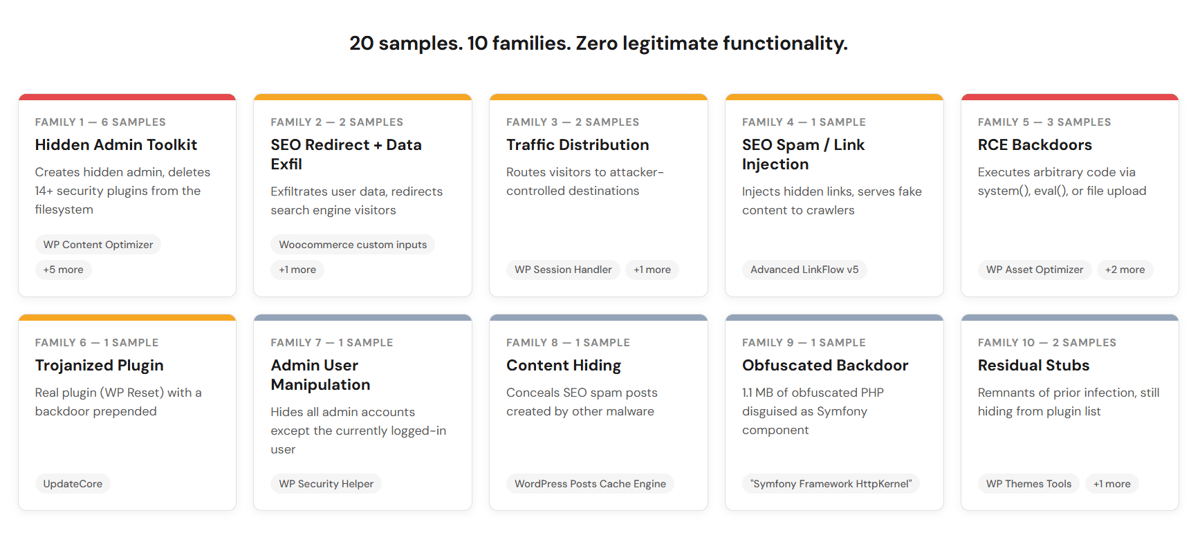
The Fake Plugin Families
1. Hidden Admin Toolkit — 6 samples
Plugin names: WP Performance Tools, WP Flavor, Flavor Sync, WP Content Optimizer (×2), Site Toolkit Services
The most common and most dangerous family. These plugins create a secret administrator account on infected sites, hide it from every user listing and query surface in WordPress, then systematically delete security plugins from the filesystem. Five of the six share a single master key (7f3ac891d4e60b52a9f7186db345ce90) that lets the attacker calculate login credentials for any infected site by knowing its domain name.
They identify security tools by functional fingerprint (checking for characteristic code strings rather than plugin names) and remove everything: plugin files, WAF configurations, scheduled security tasks, and .htaccess rules. The list of targeted tools includes Wordfence, iThemes Security, Cerber, All-In-One Security, BulletProof Security, Defender, NinjaFirewall, Shield Security, and several activity logging plugins.
The full technical breakdown of an advanced malware from this family is in this WordPress security deep dive article.
2. SEO Redirect + User Data Exfiltration — 2 samples
Plugin names: Woocommerce custom inputs, Woocommerce custom TAG
Disguised as WooCommerce extensions. On activation, they send every WordPress user's login name, email address, and display name to an external server, then repeat the exfiltration every 14 days via a scheduled task. Desktop visitors arriving from search engines in the US, Canada, or Japan are redirected to attacker-controlled content. Both samples share the same codebase, credentials, and C2 infrastructure (the pinkfels.shop and a.pinkbear.my.id domains).
3. Traffic Distribution System — 2 samples
Plugin names: WP Session Handler, Performance Enhancer
Traffic distribution systems route visitors to destinations controlled by the attacker. The more sophisticated sample (WP Session Handler) includes anti-scanner detection: it recognizes security tool user agents — including WPScan, Nessus, Burp Suite, and Nikto — and pauses all operations for 30 minutes when it detects them. It also blocks all external redirects except a narrow whitelist (payment gateways, OAuth providers), preventing competing malware from hijacking its traffic.
The simpler variant injects JavaScript that contacts three TDS domains in a fallback chain (newtdsone.shop, cptoptious.com, captioto.com), targeting only visitors who aren't logged in to WordPress.
4. SEO Spam / Link Injection — 1 sample
Plugin name: Advanced LinkFlow v5
Injects hidden links positioned off-screen (left:-7000px) into post content, loop elements, and the page footer. It serves different content to search engine crawlers than to human visitors, verifying Google's crawler by reverse DNS lookup against Google's IP ranges. It polls a C2 server (ssocialvibe.world:8443) for "tasks" that append HTML blocks to existing WordPress posts, turning the published content into a host for SEO spam. It sends the complete page inventory, every URL, slug, and title to the attacker.
5. Remote Code Execution Backdoors — 3 samples
Plugin names: WP Asset Optimizer, Elementor Safe Dash, WordPress Core
Three different approaches to the same goal: executing arbitrary code on the server. WP Asset Optimizer passes URL parameters directly to system() when given the right key. Elementor Safe Dash allows arbitrary file upload to the web root when given a token whose SHA256 hash matches a hardcoded value. "WordPress Core" reads an encrypted file from disk, decrypts it with AES-256-CTR using a hardcoded key, and passes the result to eval(). The actual payload is invisible until runtime.
6. Trojanized Legitimate Plugin — 1 sample
Plugin name: UpdateCore (bundled with WP Reset)
Unlike the other families, this one takes a real, functional plugin (WP Reset) and prepends a backdoor. It registers an unauthenticated REST API endpoint (/uc/v1/cmd) that accepts commands with no permission check and __return_true as the permission callback. It also protects its own content: posts marked with a _uc_protected meta key can't be deleted or edited by the site owner.
7. Admin User Manipulation — 1 sample
Plugin name: WP Security Helper
Modifies WordPress database queries so the admin Users screen shows only the currently logged-in administrator. All other admin accounts become invisible. Uses hex-encoded string literals for evasion. Has a bypass: accounts become visible when a specific URL parameter (?sp) is present.
8. Content Hiding — 1 sample
Plugin name: WordPress Posts Cache Engine
Hides specific posts and comments from the WordPress admin panel based on naming patterns (post_name containing l0- or post_content containing a specific HTML comment). This is a support tool for other malware: it conceals SEO spam and doorway pages created by a separate infection so the site owner doesn't notice them during routine content management.
9. Heavily Obfuscated Backdoor — 1 sample
Plugin name: "Symfony Framework HttpKernel"
1.1 MB of heavily obfuscated PHP disguised as a Symfony framework component. Randomized variable names, fake configuration constants, and a structure consistent with a comprehensive webshell.
10. Residual Stubs — 2 samples
Plugin names: WP Themes Tools, One User Tools
Both hide themselves from the WordPress plugin list. Self-hiding behavior has no legitimate purpose, indicating these are remnants of a previous infection that weren't fully cleaned up. They demonstrate how incomplete remediation leaves artifacts that still modify the site's behavior.
What Stood Out
Four patterns across the full sample set are worth highlighting.
Nearly universal hiding
19 of the 20 samples remove themselves from the WordPress plugin list. This is the single most common behavior across all families. Most use the all_plugins filter to suppress their entry. Some advanced variants use CSS injection instead, a harder-to-detect method. If a plugin doesn't appear in the admin panel but exists in the filesystem, that's a strong indicator of compromise.
Security plugin deletion
All six Hidden Admin Toolkit samples actively scan for and delete security tools from the server's filesystem. They use raw PHP unlink() and rmdir() calls rather than WordPress functions, bypassing the application layer entirely. No WordPress hook can intercept these calls, which means security plugins running inside WordPress have no opportunity to block or log the deletion.
The list of targeted tools spans 14+ plugins, including both file-based security (Wordfence, NinjaFirewall) and activity logging (WP Security Audit Log, Simple History, Activity Log). WAF bootstrap configurations, cron jobs, and .htaccess rules are cleaned up as well.
Malware vs. malware
The Hidden Admin Toolkit family doesn't just attack the site. It identifies and demotes competing backdoor accounts by checking for known meta keys, suspicious usernames (stored as MD5 hashes to avoid detection), and disposable email domains. It scans for and removes competing malicious plugins. It cleans webshells from the uploads directory, with a whitelist to protect its own files. It even removes older versions of itself.
Persistence that survives deletion
The most advanced samples use a three-layer persistence strategy: the plugin re-activates itself on every page load if deactivated, a dropper file in the mu-plugins directory restores it from backup if deleted, and a backup copy stored in wp-content/upgrade/ provides the restoration source. The mu-plugins directory is loaded by WordPress automatically on every request without requiring activation. All three layers need to be addressed simultaneously, or the malware returns on the next request.
Behavioral Patterns Across Families
| Technique | Families | Sample count |
|---|---|---|
| Plugin self-hiding | 1, 2, 3, 4, 5, 7, 8, 9, 10 | 19 |
| Hidden admin creation | 1 | 6 |
| User visibility manipulation | 1, 7 | 7 |
| Security plugin removal | 1 | 6 |
| Competing malware removal | 1 | 6 |
| mu-plugins persistence | 1 | 5 |
| Data exfiltration to C2 | 2, 4 | 3 |
| SEO redirect / visitor hijacking | 2, 3, 4 | 5 |
| Remote code execution | 5, 6 | 4 |
| External JavaScript injection | 3, 5 | 2 |
| Anti-deactivation | 2, 6 | 3 |
| Self-updating from C2 | 2 | 2 |
| Anti-scanner evasion | 3, 7 | 2 |
| Post content manipulation | 4, 6 | 2 |
| Code obfuscation (hex/chr/base64) | 2, 4, 5, 7, 9 | 6 |
Family 1's advanced variants use a particularly notable C2 technique: they fetch encrypted JavaScript payloads from a Cloudflare Worker URL stored in a Binance Smart Chain smart contract. This is a variant of the EtherHiding technique documented in the UNC5142 campaign. The known EtherHiding campaigns deliver fake browser update pages. This variant delivers encrypted JavaScript injected directly into the page footer. See here for the full technical breakdown.
How to Check If You're Affected
You don't need deep technical knowledge to perform an initial check.
In your filesystem:
Look for plugin directories you don't recognize. The plugin names from this study are listed in each family section above. Check specifically for:
- wp-content/mu-plugins/ — look for PHP files matching wp-??????-loader.php or 00-site-cache.php. WordPress doesn't create files with this naming pattern.
- wp-content/upgrade/wp-maintenance.tmp — this backup file has no legitimate purpose.
- Missing security plugin directories that should be present. If you had Wordfence or another security plugin installed and the directory is gone, investigate.
In your database:
Check wp_usermeta for entries with these keys, which are markers used by the backdoor families in this study:
_wp_ui_render_cfg
_wp_cache_hash
_wps_sig
_sys_token
_bk_hash
_adm_key
_wp_sys_hash
_stk_sig
Check wp_users for administrator accounts you don't recognize, especially those matching the pattern usr_ followed by eight hex characters.
In your admin panel:
- Compare the number of administrators shown in Users → All Users with a direct database query (SELECT COUNT(*) FROM wp_users INNER JOIN wp_usermeta ON wp_users.ID = wp_usermeta.user_id WHERE wp_usermeta.meta_key = 'wp_capabilities' AND wp_usermeta.meta_value LIKE '%administrator%'). If the numbers don't match, a plugin may be hiding users.
- Check whether your security plugins are still installed. If they were previously active and have disappeared without explanation, investigate immediately.
On your frontend:
View page source in a non-admin browser session (or incognito/private window) and search for <script id="wp- followed by six hex characters and -perf". This is the JavaScript injection signature used by Family 1.
What This Means for WordPress Security
Fake plugins exploit a trust gap in the WordPress ecosystem. Site owners assume that anything in their plugins directory was installed intentionally. WordPress itself treats all activated plugins as trusted code. There's no sandboxing, no permission restrictions, and no behavioral monitoring at the application level.
This class of threat makes that assumption dangerous. The most common fake plugin family's first action is to remove the security tools that might detect it, using filesystem calls that bypass WordPress entirely. When malware's first move is to delete defenses, where those defenses run matters as much as what they do.
How Imunify360 Handles These Threats
All 20 samples in this study are detected by Imunify360's multilayer defenses, many of which run below the WordPress application level. Detection uses behavioral signatures in addition to file hashes, so new variants using the same techniques are caught even before their specific hash is catalogued.
Most notably, Proactive Defense, Imunify360's real-time PHP security module, monitors PHP script execution at the engine level, outside of WordPress. When it identifies a malicious script, it kills the execution entirely, so none of the malware's operations run. It isn't a PHP file in a plugin directory that can be deleted.
When 19 of 20 malware samples hide from plugin detection and the most common family deletes security plugins, defenses that operate only within WordPress face a structural limitation. Multilayer protection with defenses at the server, PHP runtime, and application levels is the architecture that can handle this class of threat.
Studying these malware families is also informing ongoing improvements to behavioral detection. The techniques documented here: credential derivation patterns, mu-plugins persistence, blockchain C2 become detection inputs for future signatures.
Indicators of Compromise
Sample Hashes
| Family | Plugin Name | SHA256 |
|---|---|---|
| 1 — Hidden Admin Toolkit | WP Performance Tools | 3a54638e26d4c38845c14cca4c3501abdbe8532a3984437c74a68e16b2a5d27f |
| 1 — Hidden Admin Toolkit | WP Flavor | 82849aba7cc61d3b55c4a5da443257fa9428d861de9ddb1e0de450342ea0b0d1 |
| 1 — Hidden Admin Toolkit | Flavor Sync | 3f3745f8aae976d4fe1e9061701a2e4281ecccee702e6f94af6e13d74aad6a2b |
| 1 — Hidden Admin Toolkit | WP Content Optimizer | 1eea58480fa71dbb68901caf26aabd0e97e54f142229fa0cd015e3fad48f569e |
| 1 — Hidden Admin Toolkit | WP Content Optimizer | f55cf210763db09b1b26574489c1b168ece10d3a630c09dba4ffe50b883ae673 |
| 1 — Hidden Admin Toolkit | Site Toolkit Services | 7fd8f0f9fe95507830220e8172a4471907adcac8b8cf9bb27f07fa3b9629b039 |
| 2 — SEO Redirect | Woocommerce custom inputs | 8965091deda9e74c959468b6e72d9f7b831a1fda6c633516ba4875ff8476c79a |
| 2 — SEO Redirect | Woocommerce custom TAG | 3a72983b2e794cb07417a16d2a7bd77210d7cff3840c183578c8318e91e933c5 |
| 3 — TDS | WP Session Handler | 131aaea8a5569516afd79d3540cd1721a44d46b164ecaeddd49748b280159745 |
| 3 — TDS | Performance Enhancer | f99d0c139742f3b8aa3fb0201bb462597b71ae8212e6d6875e00a8ea67ed1284 |
| 4 — SEO Spam | Advanced LinkFlow v5 | 496df7ce412fc1cce566d5ad88c483c4eb5b37dddd705481da96adf193b33ab3 |
| 5 — RCE Backdoor | WP Asset Optimizer | d8a921a3c855d23f8f08a7a517571e03cd982e0faee8875820432573db56b885 |
| 5 — RCE Backdoor | Elementor Safe Dash | 78fdac2f9ca924ca30836252d67da2db52d0f7f2d733c2f3dab9ca767b4558bd |
| 5 — RCE Backdoor | WordPress Core | 7fe7db4708680058f3d23fa7ea7fb56e3fa4859a3ee68692335f97ca60fe3852 |
| 6 — Trojanized Plugin | UpdateCore | 09d2e10331be0ff11c144c1e151ba34dfae6b3402235bb35239349133eca40b9 |
| 7 — Admin Manipulation | WP Security Helper | 0a26e477951896659dbc5b0b18929995303a9ab4e071288b40691e0b366b96a1 |
| 8 — Content Hiding | WordPress Posts Cache Engine | 17571ec94a50781fe3c6a755d9d51617fbea66c574927aaae218b2ebf4c53491 |
| 9 — Obfuscated Backdoor | "Symfony Framework HttpKernel" | 8d53aac388df998a93b94ce94bc28a7f7760622bbf072d83b9592380648518ce |
| 10 — Residual Stub | WP Themes Tools | 5e32c4af251835248b87bc676ce34a0479adeac6507775b3985b7a525a5c4f9a |
| 10 — Residual Stub | One User Tools | b0d588366ae6f75b99cac2dff9139569a90e599cc18f98062a4ee52c2d3d6827 |
C2 Infrastructure
| Domain | Used By | Family |
|---|---|---|
| pinkfels.shop | Woocommerce custom inputs | 2 |
| a.pinkbear.my.id | Woocommerce custom TAG | 2 |
| ssocialvibe.world:8443 | Advanced LinkFlow v5 | 4 |
| newtdsone.shop | Performance Enhancer | 3 |
| cptoptious.com | Performance Enhancer | 3 |
| captioto.com | Performance Enhancer | 3 |
| validteachers.com.au | WP Asset Optimizer | 5 |
Family 1 advanced variants use a BSC smart contract (0x8170119B70b4E8c65Ef821425c00c35CDA15d9b0, method 0x3bc5de30) to retrieve an encrypted Cloudflare Worker URL for JavaScript payload delivery.
Common Filesystem and Database Markers
| Indicator | Type | Family |
|---|---|---|
| Master key: 7f3ac891d4e60b52a9f7186db345ce90 | Cryptographic | 1 |
| User meta: _wp_ui_render_cfg | Database | 1 |
| User meta: _wp_cache_hash | Database | 1 (older variant) |
| mu-plugins dropper: wp-[a-f0-9]{6}-loader.php | Filesystem | 1 |
| Backup: wp-content/upgrade/wp-maintenance.tmp | Filesystem | 1 |
| Frontend inject: <script id="wp-[a-f0-9]{6}-perf"> | Frontend | 1 |
| UpdateCore token: a1b2c3d4e5f67890abcdef1234567890fedcba0987654321 | Authentication | 6 |
| RCE key parameter: _wp_ssh_key=A1B2-C3D4 | Authentication | 5 |
| Elementor hash: 022e386ce60a8b92c530971f3b99637e58873e5c1614e6f0d0666bc8e6ffaffe | Authentication | 5 |
| AES key: 000102030405060708090a0b0c0d0e0f101112131415161718191a1b1c1d1e1f | Cryptographic | 5 |



.png?width=115&height=115&name=pci-dss%20(1).png "pci-dss")